
Appearance
Admin Users Module
The Admin Users module lets administrators monitor and manage non-admin accounts across the application.
Admin location
Open the Users module from the admin panel:
text
Admin -> Users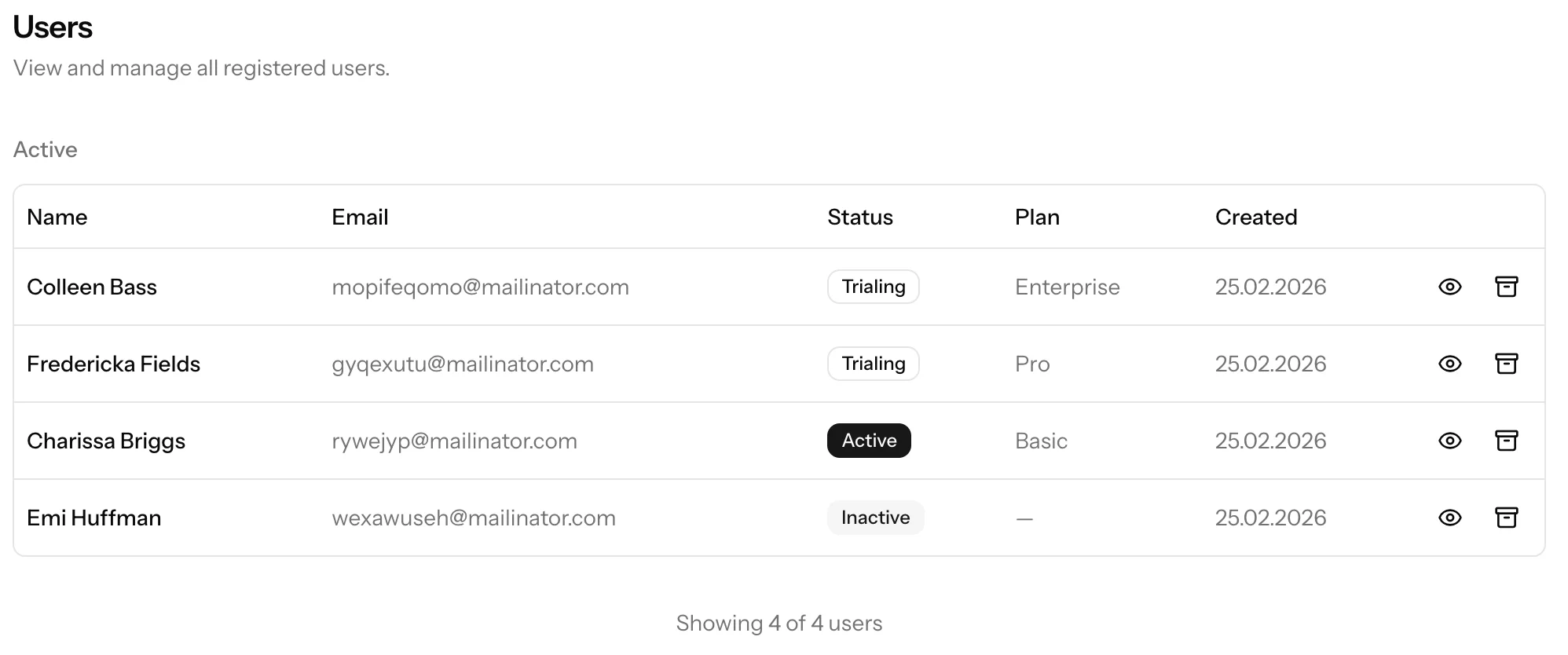
What admins can do
- Browse active users with pagination
- View deactivated users in a separate list
- Open a detailed profile for each user
- Deactivate a user (with confirmation)
- Restore a deactivated user
- Permanently delete a deactivated user (password confirmation required)
User status and billing visibility
The module shows user access/billing state in list and detail screens, including:
activetrialingfree_tierinactive
On detail view, admins can also inspect:
- tenant information
- subscription state and cycle dates
- Stripe customer reference, with quick link to Stripe dashboard
Deactivate vs Delete
Deactivate
- Soft-deletes the user
- Soft-deletes the associated tenant/workspace
- Cancels active subscription immediately
- Allows later restoration
Restore
- Restores user and tenant records
- Reapplies free-tier access if free tier is currently enabled in app settings
Permanently delete
- Requires current admin password confirmation
- Cancels active subscription immediately
- Permanently deletes user and tenant
- In multi-db tenancy mode, also removes the tenant database
This action is irreversible.
Important constraints
- Admin-role accounts are excluded from this module and cannot be managed from it.
- This module is intended for operational user lifecycle management, not role/permission authoring.